Demystifying Embroidery Files: Formats Explained Simply
Posted by Absolute Digitizing
Filed in Business 86 views
Embroidery looks simple on the surface. You pick a design, load it, and stitch it out. But behind every clean stitch is a special file. This file tells your machine what to do. It controls every move. If you are new, this part can feel confusing.Many people ask me the same thing. “Why are there so many file types?” I had the same question when I started. I learned the hard way. I tested files, made mistakes, and fixed them. That is why I always suggest reading The Ultimate Guide to Embroidery File Formats before you begin working with designs. It helps you avoid simple errors.In this blog, I will explain everything in a very easy way. No hard words. No long steps. Just simple ideas that you can follow.
What Is an Embroidery File?
An embroidery file is not like a normal image. It is not a JPG or PNG. You cannot just open it and print it.
Instead, it is a set of instructions.
It tells your machine:
- Where to stitch
- When to stop
- Which color to use
- How fast to move
Think of it like a map. Your embroidery machine follows that map to create a design.
Why File Formats Matter
Not all machines read the same file. This is very important.
If you load the wrong format:
- Your machine may not open it
- The design may break
- The stitches may look messy
I remember loading a file once that looked perfect on screen. But on fabric, it was a mess. The reason? Wrong format.
So yes, file formats matter a lot.
Common Embroidery File Formats
Let’s look at the most used file types. I will keep this very simple.
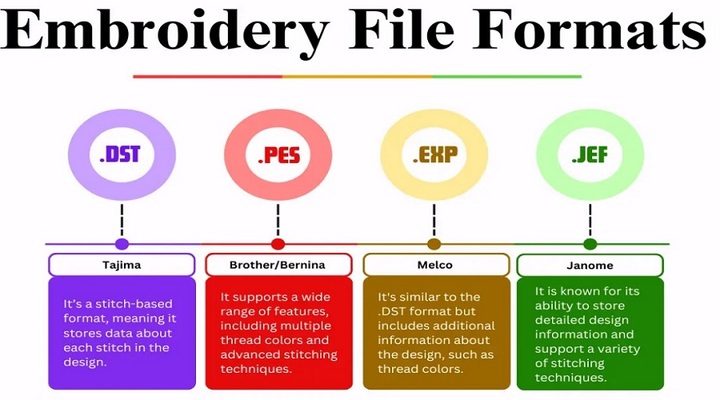
DST Format
This is one of the oldest formats.
- Used by many industrial machines
- Very basic
- Does not store color info
It only stores stitch data. So your machine will not know the colors.
PES Format
This is used by Brother machines.
- Stores stitch data
- Stores color info
- Easy to use
This is one of the most popular formats for home users.
JEF Format
This format works with Janome machines.
- Clean stitch control
- Good for home machines
- Supports color
If you use Janome, you will see this a lot.
EXP Format
A simple format used by many machines.
- Light file size
- No color info
- Basic stitching
It is useful but limited.
Why There Are So Many Formats
This is a common question.
Each machine brand made its own format. They wanted their machines to work best with their own system.
So now we have many formats.
It is like phone chargers before USB became common. Each brand had a different one.
How to Choose the Right File
Choosing the right file is easy when you know your machine.
Step 1: Check Your Machine Type
Look at your manual. It will list supported formats.
Step 2: Match the File
If your machine uses PES, always use PES.
Do not try random formats.
Step 3: Test Small Designs First
Before using a big design, test a small one.
This saves time and fabric.
Can You Convert Embroidery Files?
Yes, you can. But be careful.
There are tools that convert files from one format to another.
When Conversion Works Well
- Simple designs
- Basic stitches
- Small files
When It Can Fail
- Complex designs
- Many color changes
- Heavy stitch patterns
I have seen designs break after conversion. Stitches went out of place. So always test after converting.
Tools for File Conversion
Here are some tools that many people use:
Free Tools
- Basic converters online
- Limited features
- Good for beginners
Paid Software
- More control
- Better results
- Used by professionals
If you plan to do embroidery often, investing in good software is worth it.
My First Experience With Embroidery Files
When I started, I thought any design would work.
I downloaded a file and loaded it into my machine. It did not open. I tried again. Still nothing.
Then I learned about formats.
Next, I converted the file. It opened, but the design stitched badly. The lines were off. The colors were wrong.
That day, I learned two things:
- Use the right format
- Always test before final stitching
Now, I never skip these steps.
Understanding Stitch Data
This is a simple but important idea.
Embroidery files do not store pictures. They store stitches.
Each stitch has:
- A start point
- A direction
- A length
Your machine reads this data step by step.
That is why editing embroidery files is not easy like editing images.
Why You Cannot Use Regular Images
Many beginners ask this.
“Why can’t I just use a JPG?”
The answer is simple.
Images do not have stitch data.
To use an image, you must convert it into stitches. This process is called digitizing.
What Is Digitizing?
Digitizing is the process of turning an image into an embroidery file.
It is not automatic. It needs skill.
What a Digitizer Does
- Chooses stitch types
- Sets stitch direction
- Adjusts density
- Adds underlay
Good digitizing makes a design look clean.
Bad digitizing makes it messy.
Tips for Beginners
Let me share some simple tips from my experience.
Start Simple
Do not begin with complex designs.
Pick small and clean designs first.
Know Your Machine
Learn what formats your machine supports.
This saves a lot of trouble.
Always Test Stitch
Never skip this step.
Even good files can behave differently on fabric.
Use Quality Files
Cheap or free files are not always good.
Look for trusted sources.
Common Problems and Fixes
Here are some issues you may face.
Design Not Opening
Cause: Wrong format
Fix: Use the correct format or convert the file
Wrong Colors
Cause: Format does not store color
Fix: Set colors manually on your machine
Broken Stitches
Cause: Bad conversion or poor digitizing
Fix: Use original file or better software
How Experts Handle Files
Professionals follow a simple routine.
- They check the format first
- They test every design
- They use trusted software
- They avoid random downloads
This keeps their work clean and smooth.
Building Trust in Your Work
If you sell embroidery designs or products, file quality matters a lot.
Good files mean:
- Clean stitching
- Happy customers
- Less waste
Bad files lead to:
- Complaints
- Returns
- Loss of trust
So always use well-made files.
Final Thoughts
Embroidery files may seem hard at first. But they are simple once you understand the basics.
Just remember:
- Files guide your machine
- Formats must match your machine
- Testing is very important
Take your time to learn. Do not rush. Even experts started as beginners.
With practice, you will feel more confident. And soon, working with embroidery files will feel easy and natural.